~/guides/ANYDOC.md
AnyDoc: PowerPoint, Excel and Word to Markdown in one command, so Claude Code can read them (3 files tested)
Firecrawl's open-source AnyDoc turns Word, PowerPoint, Excel, PDF and EPUB into clean Markdown. One npx line, a Claude Code skill, real output, the OCR limit.
Hand Claude Code a PowerPoint or Excel file and it cannot read it directly and has to write a script to unpack it first. Firecrawl's open-source AnyDoc turns Word, PowerPoint, Excel, PDF and EPUB into clean Markdown in one command, keeping tables, chart numbers and speaker notes. This is the full guide to the ANYDOC reel: I converted three files for real, so here is why you convert, how, what comes out, how to install it as a skill so Claude Code does it on its own, and the limit with scanned PDFs.
01The result first: the same deck as Markdown Claude reads at a glance

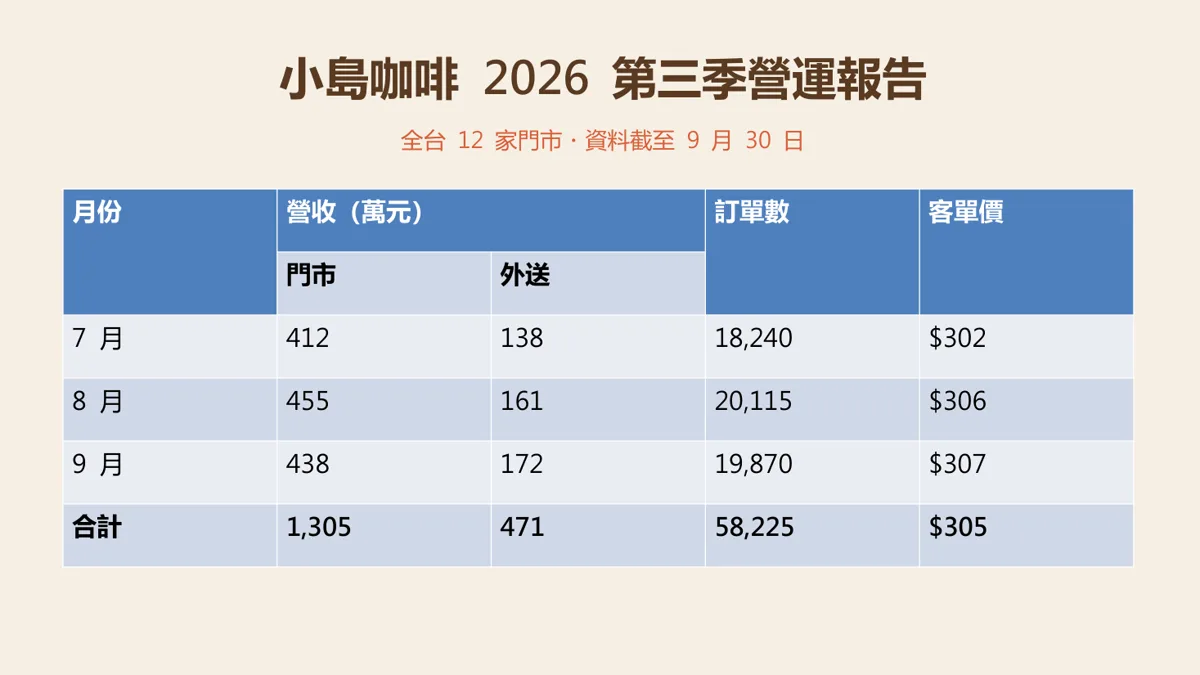
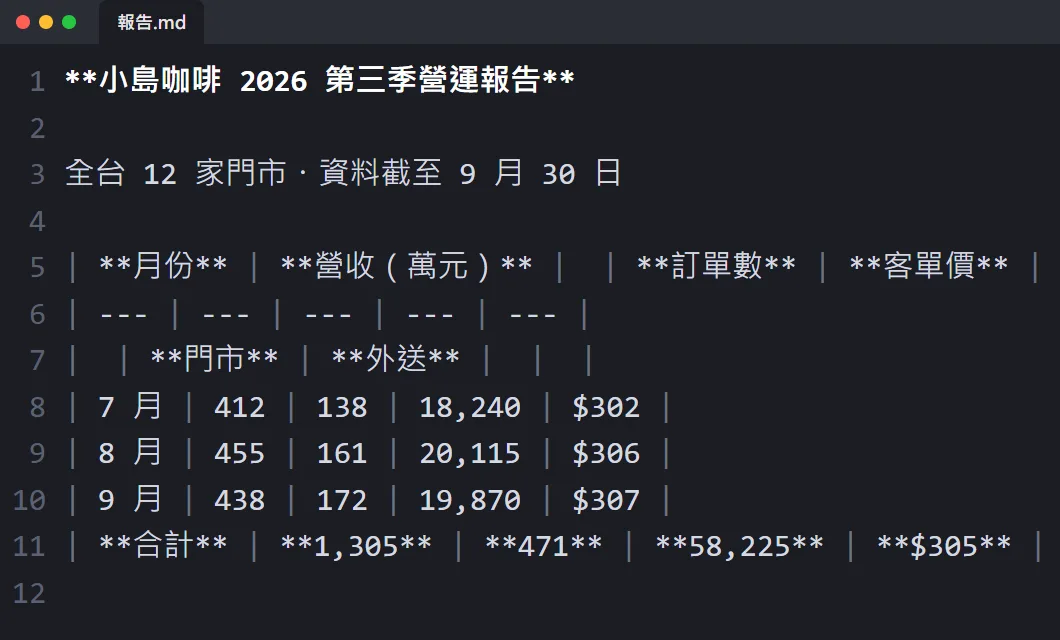
When you're done you'll have:
- An .md file with the headings, tables, bullets and speaker notes in their original structure.
- A Claude Code skill that converts Word, PowerPoint and Excel files on its own before reading them.
- A clear idea of which files convert on your machine and which (scanned PDFs) go to the cloud.
02Why Claude Code can't read PowerPoint and Excel

Claude Code's file-reading tool refuses files it treats as binary, such as .xlsx; then it has to write a script or use a skill to unpack them. That is because .pptx, .docx and .xlsx are really zip archives full of XML.
- Our two-slide deck unzips into 50 files.
- slide1.xml alone is 7,308 characters, mostly layout tags.
- The whole deck as Markdown is 969 bytes.
03Step 1: convert with one command

If you have Node.js you can run it straight away; the first run downloads the build for your computer:
npx @firecrawl/anydoc [report.pptx] -o [report.md]
If you use it a lot, install the command:
npm install -g @firecrawl/anydoc
anydoc [report.docx] -o [report.md]
pip install firecrawl-anydoc
04Step 2: check what came out
What our three files turned into:
- The deck's table became a Markdown table; the merged header became an empty cell and every number was right.
- The bar chart's numbers became a table, so Claude can read July, August and September.
- Speaker notes became quotes starting with ">" after their slide.
- Bullets kept their levels; the Excel formula totals (377, 354, 731) came through.
- The Word contract's headings, table and 1. 2. 3. numbering stayed in order.
05Step 3: install it as a skill so Claude Code converts on its own

If you don't want to convert by hand every time, install it as a skill. In your project's terminal:
npx skills add firecrawl/anydoc
Then just hand Claude Code the file:
Read [report.pptx], give me three key points, then turn the numbers in its tables into one comparison table.
06Good to know

- Scanned or image-only PDFs fail (it stops). Only with --ocr hosted do they go to Firecrawl Parse for OCR, and the whole file is uploaded; no signup, FIRECRAWL_API_KEY raises the limits. Think twice with confidential files.
- Don't want to install anything? The official browser version at firecrawl.github.io/anydoc converts on your computer and never uploads the file.
- Images keep only their alt text; the pictures themselves are not in the Markdown.
- The comparison scores in the README are Firecrawl's own benchmark; treat them as a guide.
- AnyDoc is an MIT-licensed open-source project, not an official Anthropic tool.
- You found this guide by typing ANYDOC on the site from the link in bio; there is no DM.
Sources
What should the next reel cover?
I test Claude and AI tools every day and turn the useful ones into reels. Follow @vivianlin.tech to catch each new guide.


