~/guides/UPGRADE.md
How many miles short of business class? Let Claude list your upgrade currencies, work out the gap and the cheapest fix
Give Claude your ticket, let it ask about your cards and miles, and get an upgrade-currency table with the gap. 4 prompts, STARLUX rules, and a security line.
I gave Claude one economy ticket, and it worked out that I'm only 1,200 miles short of business class. It also laid out every "upgrade currency" I have in one table: which work, which don't, and how far short I am. To be clear, the ticket is made up: STARLUX, Taipei to Tokyo Narita and booking code Q7MK2V are all fictional, and so are the miles and card spend. But the table is a real reply from Claude, tested on 23 Oct. I used STARLUX as the example because its upgrade rules are published in full on its website. This guide gives you the full prompts, shows how to paste the airline's rules back in so Claude recalculates, how to close the gap when you're short, what Claude in Chrome can help with, and why I don't let it log into my airline account. I can't promise you'll get the upgrade: upgrade seats vary by flight, and the airline's website has the final word.
01The result first: an upgrade-currency table and the gap
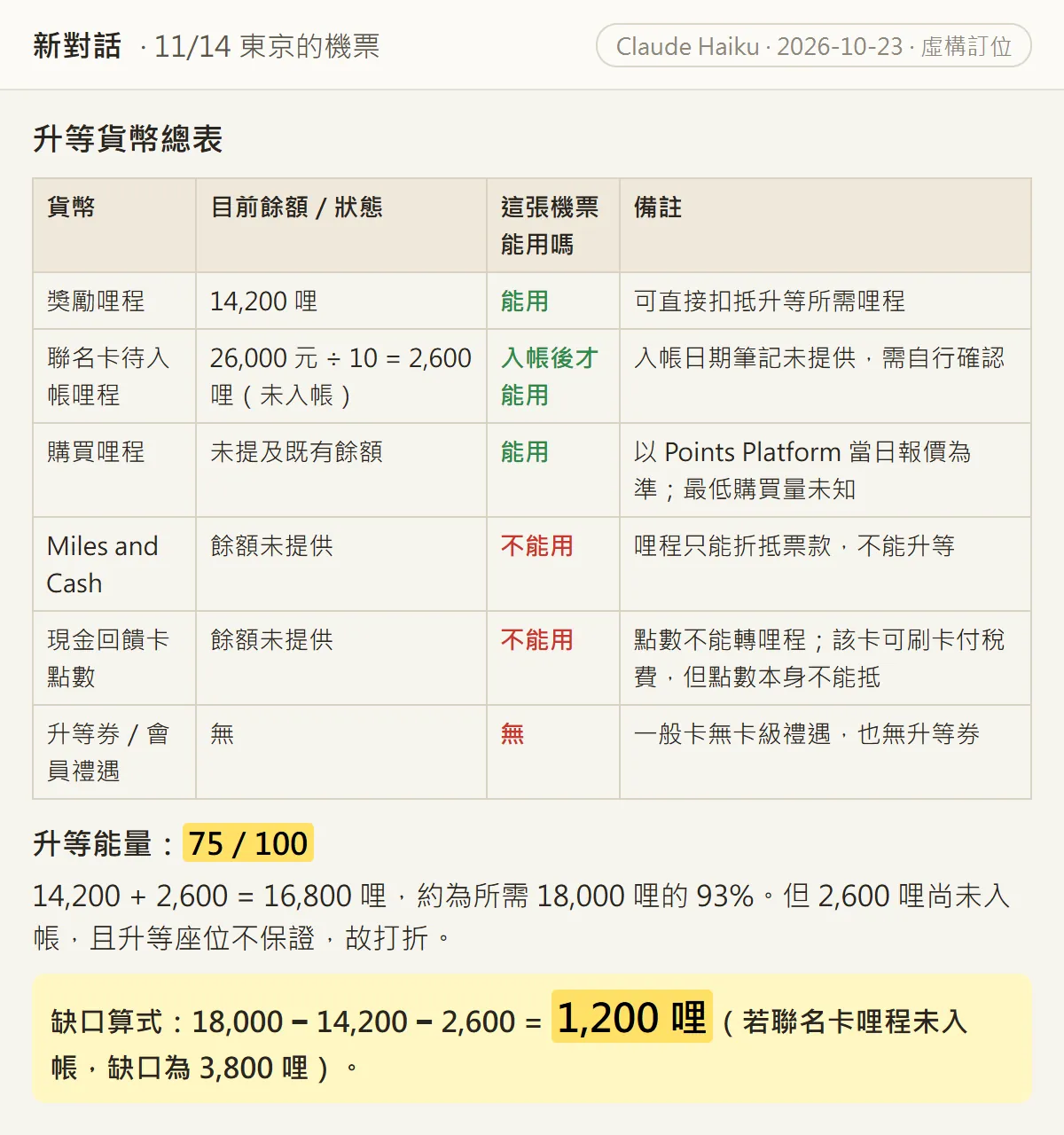
I gave it the details of one ticket, answered a few questions it asked me, and it put together this table. Each of the six "currencies" says whether it works for this ticket:
- Award miles, 14,200: usable, they can go straight toward the upgrade.
- Co-brand card miles not yet credited, 2,600: usable only once they post.
- Bought miles: usable.
- Miles and Cash: not usable, it only offsets the fare and can't be used for upgrades.
- Cash-back card points: not usable, the points can't be turned into miles.
- Upgrade vouchers / member perks: none.
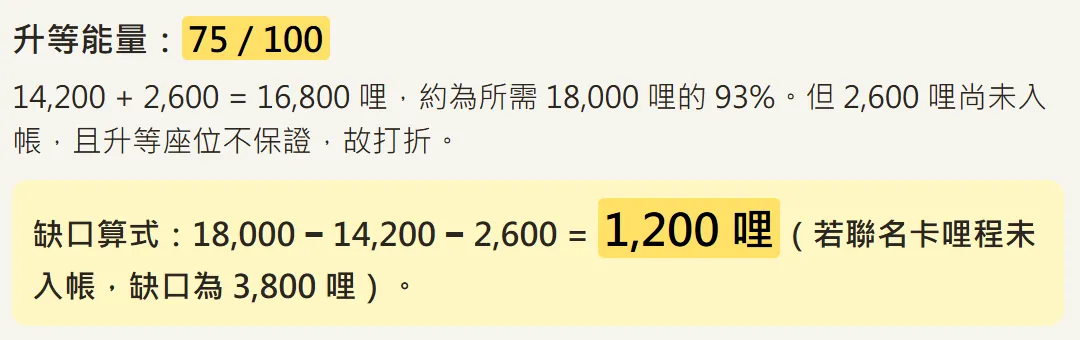
On STARLUX, an upgrade from economy to business on a two-class aircraft within Asia costs 18,000 miles per segment. Take away the 14,200 miles I have and the 2,600 that haven't posted yet, and you get 1,200. It also covers the other case: if the card miles don't post, the gap is 3,800 miles. The "upgrade score 75/100" is Claude's own rating, not an airline metric.
Read on for the full prompts, the key STARLUX upgrade rules, the order to close the gap in, and how to set up Claude in Chrome, plus the security line I hold myself to.
02Step 1: give it the airline and booking details, and let it ask you
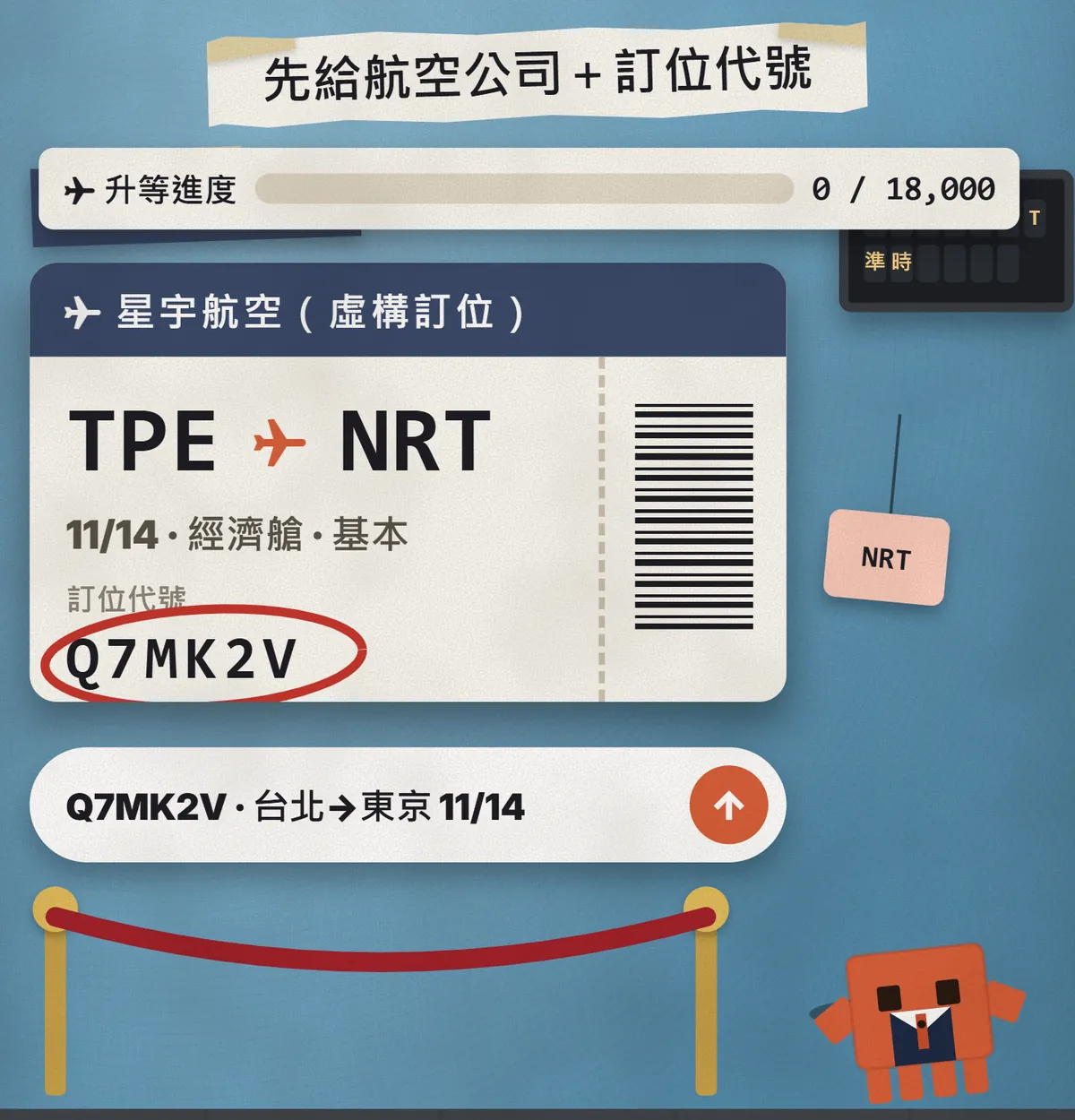
- Open Claude and start a new chat.
- Paste the prompt below and replace the [ ] parts with your ticket details.
- It will ask you questions first. Answer honestly, and say so if you don't know.
- Once it has made the table, move on to the check in the next step.
I've booked a ticket with [airline]: [date] [from] → [to], economy, fare type "[e.g. Basic]". I'd like to upgrade to business.

Ask me every question you need about my credit cards, miles and membership, then list every "currency" I have that could go toward upgrading this ticket, as a table: usable / not usable / how much I'm short.
Finish with the sum for the gap. Wherever you're unsure, just write "unsure".

Letting it ask first matters because most people don't think of everything they hold. Card miles that haven't posted yet or cash-back points only get counted once it asks about them.
03Step 2: paste the airline's rules back in and recalculate (STARLUX as the example)
The first table is based on Claude's general knowledge. To get it right, paste the airline's own rules in full and tell it to recalculate using only those rules. Here is what I read on STARLUX's website on 23 Oct 2026:
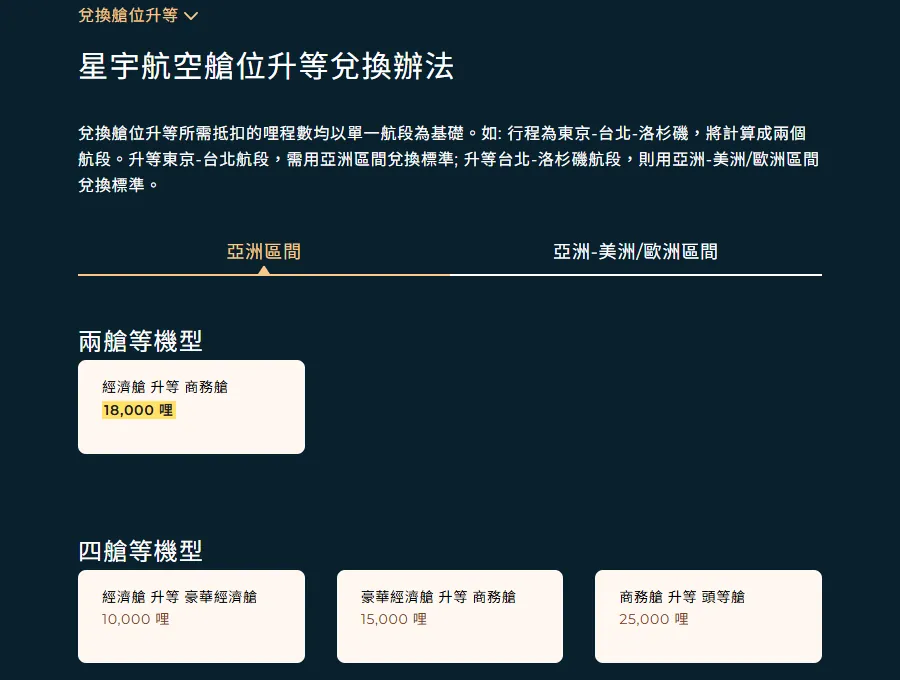
- Upgrade miles are counted per segment. Within Asia on a two-class aircraft, economy to business is 18,000 miles.
- Only tickets on a "Basic" or "Full" fare that have already been issued can be upgraded.
- "Value" and "Limited" fares, award tickets, group tickets and discounted or concession tickets, among others, can't be upgraded.
- You can only move up one cabin at a time.
- The upgrade must be booked and the miles deducted at least 3 hours before departure; airport counters won't do it.
- Log in as a member and use the online upgrade section. Some bookings, such as tickets bought through a travel agency, may not qualify for online upgrades; contact customer service.
- STARLUX adjusts the number of upgrade seats by flight, and some flights or dates offer none.
- Any airport tax or other surcharge caused by the upgrade is paid separately.
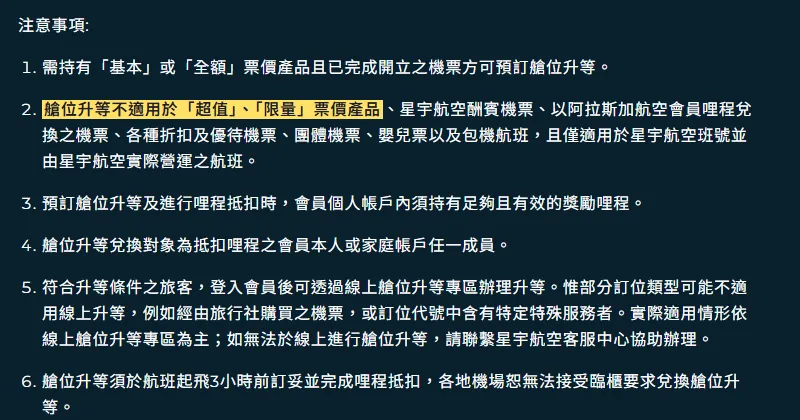
Here are the cabin-upgrade rules from [airline]'s website, pasted in full:
[paste the full rules from the website]

Using only these rules, check the table again:
1. Can my fare type be upgraded?
2. How many miles am I short? Show the sum.
3. If I need to buy miles, how many do I actually have to buy, using the website's purchase units?
4. What is the latest I can do it?
If the rules don't say, write "not stated on the website" instead of guessing.
04Step 3: close the gap, wait for miles to post first, buy only if needed
Claude ranked three paths for me: free (earn by spending on the card), mixed (spend a little, buy a little) and most expensive (buy outright). The order is right, but the numbers need fixing against the airline's rules. This is what I'd do:
- First check when the co-brand card miles post. The E.SUN STARLUX co-brand card page says overseas spending earns up to 1 mile per NT$10, and the actual rate depends on your card tier. Check your account or ask the bank for the posting date.
- If you're still short after they post, then consider buying. STARLUX sells miles online in 1,000-mile units, at least 1,000 miles per purchase, and bought miles can be used for cabin upgrades.
- Do the maths in units: 1,200 miles short means buying 2 units, so 2,000 miles. Claude's mixed plan says "buy 600 miles"; in reality that would also be 1,000.
- I'm not giving a price here. The website decides whether you pay in NT$ or US$ from the address in your member profile, and payment happens on the Points Platform run by Points.com. Check the amount on the purchase page yourself.
- Miles and Cash only offsets the fare and can't be used for upgrades, so leave it out.

Rank the ways I can close the gap: first the ones that cost nothing (like waiting for card miles to post), then the ones that cost money.
For each, write what to do, the latest it has to be done, and the risks.
If I need to buy miles, count them in the website's purchase units. Don't estimate prices; I'll check those on the website myself.
My deadline: departure is [date time], and the upgrade has to be done [3] hours before departure.
05Going further: turn on Claude in Chrome and let it read the airline's rules
Claude in Chrome is a Chrome extension that lets Claude open pages, read them and click buttons in your browser. According to the help centre, it's available on all paid plans (Pro, Max, Team and Enterprise), and the Chrome side panel is in beta.
- Find Claude in Chrome in the Chrome Web Store and click "Add to Chrome".
- In the Claude desktop app, click your initials in the lower left and select "Settings".
- Go to "Connectors".
- Find Claude in Chrome and click "Configure".
- Turn the connector on. It's off by default, so you turn it on for each chat from the "Connectors" drop-down.
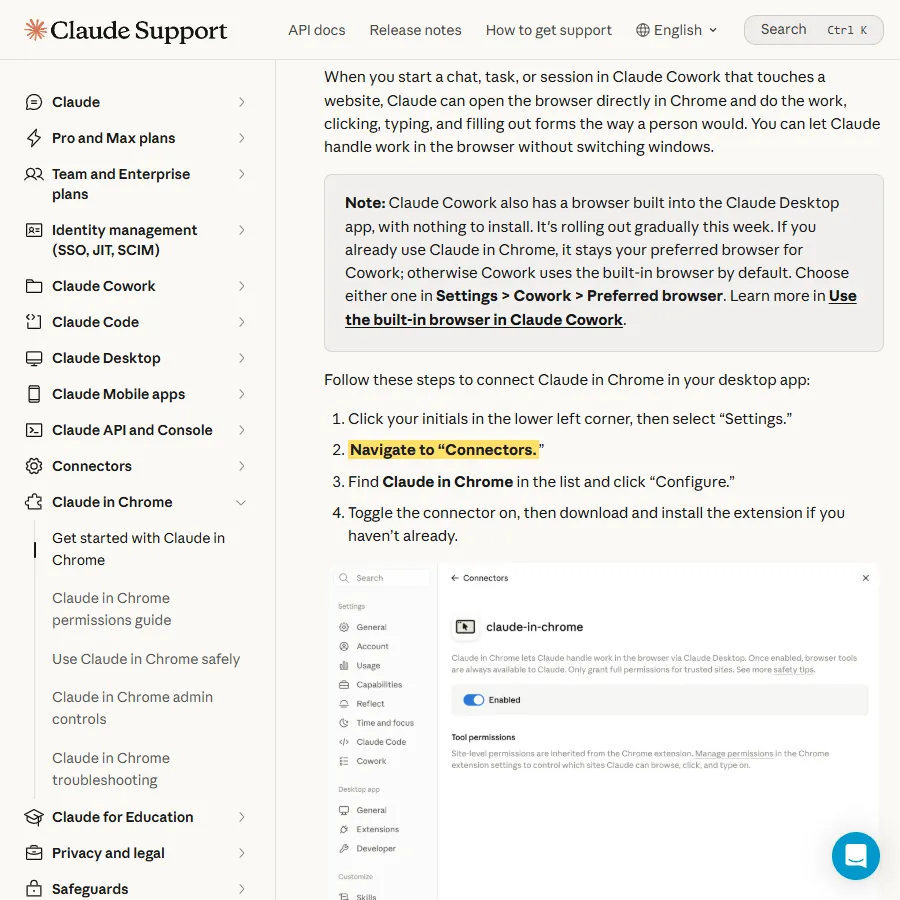
What I'd let it do is the part that needs no login: open the airline's public rules page, bring back the key points with the original wording, and check them against my table.
Open the cabin-upgrade rules page on [airline]'s website. Don't log in, don't fill in any forms and don't click buy.
Find:
1. How many miles an economy-to-business upgrade costs on my route
2. Which fares can't be upgraded
3. The latest it has to be done
Quote the page's own wording for each point, then compare it with our table and list anything that differs.
06Letting AI log into your airline account is a security decision

Checking upgrade seats and booking the upgrade both need your member login; buying miles needs your card. Both mean handing your account and your money to an AI. This is what Anthropic itself advises on its official pages:
- claude.com/chrome says: "Skip banking, health records, and anything with credentials you wouldn't share."
- The help centre strongly advises against using Claude in Chrome to manage or take actions on sensitive information, such as managing financial accounts or investments. It also says you remain responsible for any purchases or financial transactions it makes for you.
- It recommends a separate browser profile without access to sensitive accounts.
- The Cowork side panel defaults to "Automatically approve". Switch to "Manually approve" if you want to review every action yourself.
- Some sites hide instructions that try to override yours. Anthropic says its protections help but aren't foolproof; if Claude acts unexpectedly, pause it.
So my rule is simple: Claude reads the rules, and I do the logging in and paying myself.
07Good to know
- Upgrades aren't guaranteed. Even with enough miles and the right fare, some flights or dates simply have no upgrade seats.
- Rules change. The STARLUX rules here are from its website on 23 Oct 2026; check the website again before you act.
- AI gets sums wrong. This time Claude ignored the 1,000-mile unit rule. Check every number yourself.
- The example booking is fictional. I didn't use it for a real upgrade, and this guide doesn't claim Claude got anyone upgraded.
- Don't paste passport numbers, card numbers or member passwords into the chat.
- Tickets bought through a travel agency may not be upgradable online; contact the airline's customer service.
- Miles purchases can't be refunded once done, and bought miles don't count toward tier status.
- Any airport tax or surcharge caused by the upgrade is paid separately.
Sources
- STARLUX: upgrade award rules (checked 23 Oct 2026)
- STARLUX: buy miles (checked 23 Oct 2026)
- STARLUX: Miles and Cash (checked 23 Oct 2026)
- STARLUX: E.SUN STARLUX co-brand card (checked 23 Oct 2026)
- Claude Help Center: Get started with Claude in Chrome (checked 23 Oct 2026)
- Claude Help Center: Using Claude in Chrome safely (checked 23 Oct 2026)
- Claude in Chrome official page (checked 23 Oct 2026)
What should the next reel cover?
I test Claude and AI tools every day and turn the useful ones into reels. Follow @vivianlin.tech to catch each new guide.


